If you’ve ever stood in front of a fully stocked refrigerated display case at a grocery store, café, or deli, you might’ve wondered: how does it stay so crisp, even after someone yanks out a half-dozen yogurt cups in 10 seconds flat? But if you’re on the other side of that equation—running a shop that’s just opened, renovating, or replacing old cases—you’ve definitely asked a way more practical question: how long does it actually take for a refrigerated display case to cool down after installation, a power outage, or when you load it up with fresh stock? As a refrigerated display case supplier who’s fielded this question 100+ times a month, I get it. It’s not just a random number—get it wrong, and your milk goes sour, your pre-made sandwiches spoil, and you’re out hundreds (even thousands) of dollars in product before the case is even ready to use. Let’s break this down like we’re chatting over a quick coffee, no stuffy engineering jargon promised. Refrigerated Display Cases
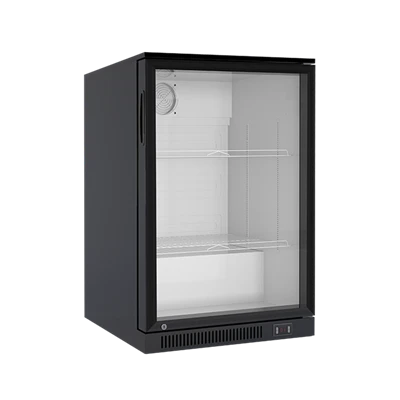
First, let’s set a baseline: a standard reach-in refrigerated display case (the kind you see for salads, dairy, or cold cuts) is designed to run between 33°F and 41°F (0.5°C to 5°C) for most foodservice use. Open-air cases (like the fridges for soda at a convenience store) are a little warmer, usually 36°F to 42°F (2°C to 6°C), because they don’t have glass doors to trap cool air. That range is non-negotiable—food safety standards (like the FDA’s Food Code) say perishable goods can’t sit above 40°F for more than 2 hours, so your case needs to hit and stay in that window fast.
Now, the biggest variable here? What the case is like before you turn it on. Let’s start with a brand-new, never-used case straight off the delivery truck. If it’s sitting in a warehouse or your shop where it’s been exposed to 70°F (21°C) room temp, how long to cool it? Most standard cases take 4 to 6 hours to reach their set temp from a cold start—but wait, that’s only if it’s empty. If it’s a glass-door case and you close it right away with no stock, it might even hit that mark a little faster, like 3.5 to 5 hours. But here’s the catch: if you just uncrated a case that was sitting in the sun for a few hours before delivery, add another 1 to 2 hours. Metal holds heat, right? Those steel walls and the base they sit on absorb way more heat than you think, so sunlight exposure will drag the cool-down time out.
What if the case is used—say, you’re replacing an old one, and the new one was stored in your back room for a week at 75°F? Same rule applies, mostly. But if it’s been plugged in before (even briefly) and then turned off for a day, it’ll cool a lot faster—like 2 to 3 hours, because the insulation’s already prepped, no need to pull heat out of brand-new unheated walls.
Now, the part most people mess up: when you load the case with product. That’s where the cool-up time gets tricky. If you toss a full load of 40°F (4°C) milk cartons and salad containers into a 70°F empty case, how long does it take? Let’s do the math: the empty case has to cool down, but then all that cold product is generating a little heat from its surface, plus the heat trapped in the packaging. Most of our clients underestimate how much product affects this. If you load a case to 80% of its maximum capacity (not overpacked, but full), add 2 to 4 hours to the cool-down time. If you overpack it—stacking soda cans so high they block the air vents, or shoving salad bins so tight there’s no airflow between them? Add another 2 to 3 hours. Airflow is everything here. The refrigeration system blows cold air through vents at the back or bottom of the case; if you block those, the cold can’t circulate, so the product stays warm, and the system works way harder to catch up.
Wait, what about power outages? That’s a whole different scenario. If your case was running at 38°F when the power cut out, how long does it take to cool back down once power is restored? Again, depends on what’s in it. If it’s half-full of 40°F product and the case only warmed up to 55°F during a 2-hour outage, it’ll take 1.5 to 2.5 hours to get back down to temp. If it was full during a 6-hour outage and hit 65°F? Give it 3 to 5 hours, and make sure you check the internal temp with a separate thermometer (not the case’s built-in gauge—those are often off by 2 to 3 degrees) before restocking.
Now, let’s talk about the outliers that make every case different. Not all refrigerated display cases are the same. A small countertop case for a coffee shop’s creamers and pastries? That’s way smaller, so it cools down in 2 to 3 hours from empty, maybe 3 to 4 with a full load. A large multi-deck open-air case for a grocery store’s produce or beverages? Those are bigger, have more insulation, and sometimes even separate cooling zones for top and bottom. A brand-new large open-air case might take 6 to 8 hours from cold empty, and 8 to 12 hours when fully loaded—because those cases move a lot more air, so they have to pull heat from a way bigger internal space.
Another big one: the case’s insulation. Cheaper cases (I see these all the time from no-name brands) have thin foam insulation, like 1 to 2 inches, which means heat seeps in way faster. So a cheap, poorly insulated case might take an extra 2 to 3 hours to cool down, or never actually get to 35°F consistently. The good ones we supply have 3 to 4 inches of polyurethane insulation, which is way more efficient, so cool-down time is on the lower end of the range, no matter what.
Wait, people often ask: why can’t I just load the case and turn it on and use it right away? Let’s be real—you don’t want to, even if you’re in a rush to open. If you put warm product into a case that’s still warming up, the system has to work overtime, which shortens its lifespan by a lot. We’ve had clients turn on a case, load it, and run it for 12 hours straight when they should’ve let it cool for 6, and then the compressor burnt out 8 months later. That’s a $1,500 fix for a mistake that took 20 minutes of planning. Also, food safety: if you load warm food, it’s going to sit above 40°F for way longer than the 2-hour limit, which can make customers sick, not to mention get you a fine from your local health department.
Let’s throw in a quick example to make this concrete. Say you’re a café opening next week. You uncrated your brand-new 48-inch glass-door counter case on Monday morning, it’s been sitting in your 72°F back room all week, unexposed to sun. On Monday at 8 AM, you plug it in, set the temp to 38°F. By 12 PM, it’s at 37°F—cool, right? Now you load it with a full case of 40°F creamers, pre-made sandwiches, and fruit cups, taking care to leave 2 inches of space between each bin and the back vents to let air flow. By 5 PM that same day, it’s holding steady at 39°F, perfect. Total cool-down time: 9 hours from plug-in, 5 of which were the initial empty cool, 4 of which were after loading. If you’d crammed all the bins tight and blocked the vents, it’d be 8 PM before it hit 40°F. That’s a whole extra 3 hours of your product sitting at risk.
Another example: power outage at a convenience store. The power cut out at 2 PM, the case was running at 38°F, and it’s a 60-inch open-air case full of soda. By 8 PM, when power comes back, the internal temp is 62°F (no more than 2 hours above 40°F, so product is still safe). You turn the case back on, set it to 36°F. How long? Let’s see: the case is big, so from 62 to 36, with a full load, that’s 4.5 to 5.5 hours. So by 1 AM, it’s ready for the next day’s stock. If you tried to put soda in right away at 8 PM, the soda would warm up to 50°F in the case during that time, which is still safe, but the system has to run for way longer to cool it all, wasting energy and wearing it out.
Wait, what about after moving a case? If you’re relocating a case across your shop, or having it delivered and the delivery guys bounced it around a highway for 2 hours? You have to wait before plugging it in. Because compressors have oil in them—if the case is tilted or jostled, the oil can get into the refrigerant lines, which causes damage if you turn it on right away. Most refrigeration techs will tell you to wait 24 hours after delivery or moving before plugging in a large case. That’s not a cool-down delay, that’s a “don’t break your $2,000 case” rule. So add that 24-hour wait to your timeline first, before even starting the cool-down clock. That’s a mistake we see all the time—someone has a case delivered, tells the drivers “plug it in right now,” and 3 months later the compressor dies because oil clogged the lines.
Now, let’s talk about how to check if your case is actually ready, because the built-in digital gauges are often wrong. A lot of cases have a little display that says “38°F” but if you stick a candy thermometer (the kind you use for baking) in the middle of a shelf, behind a product, it’ll read 42°F. That’s because the gauge is measuring the air near the vents, not the actual product temp, which is what you care about. The FDA says you need to verify the product temp is below 40°F for 2 hours straight before you call the case ready. So take 3 readings: one on the top shelf, middle shelf, and bottom shelf, at the same time, 2 hours after you think it’s ready. If all are below 40°F, you’re good to go.
As someone who’s sold hundreds of refrigerated display cases over the past 7 years, I can tell you this: the number one mistake small business owners make is guessing the cool-down time. They see a big industrial case and think “it’ll cool in 2 hours max,” or they load it full the second it’s plugged in, and end up with spoiled product or a broken case. The timeline isn’t random—it’s based on the size, insulation, load, and how long the case was exposed to warm temps before starting.
If you’re in the middle of installing a new case, or dealing with one that just came back online after a power outage, don’t rush it. If you’re not sure what your specific case needs, just reach out—we’ve been helping clients figure this out for years, no matter what kind of case you have (countertop, multi-deck, open-air, glass-door). We’ll walk you through the exact timeline based on your model, your shop’s temp, and how you’re loading it, no confusing jargon, no pushy sales stuff.

At the end of the day, a refrigerated display case is only as good as how well it cools down. Skip the guesswork, stick to the timelines we’ve laid out, and you’ll keep your product safe, your costs down, and your customers happy with fresh, cold items every time they walk by.
Chest Freezer References
- Food and Drug Administration (FDA). 2022 Food Code: Refrigerated Food Storage Requirements. U.S. Department of Health and Human Services.
- ASHRAE. 2021 Refrigerated Display Case Performance Guidelines. American Society of Heating, Refrigerating and Air-Conditioning Engineers.
- Commercial Refrigeration Manufacturers Association. 2020 Installation and Startup Best Practices for Reach-In and Multi-Deck Display Cases.
- USDA Food Safety and Inspection Service. 2019 Guide to Refrigerator and Freezer Temperature Management for Food Businesses.
Zhejiang Xingbao Electrical Appliances Co., Ltd.
As one of the most professional refrigerated display cases manufacturers and suppliers in China, we also support customized service. Welcome to wholesale bulk high quality refrigerated display cases in stock here from our factory. If you have any enquiry about pricelist, please feel free to email us.
Address: No.10 Baisha Road, Lianhang Development Zone, Chang’an Town, Haining City, Jiaxing City, Zhejiang Province, China
E-mail: zjxingbao@gmail.com
WebSite: https://www.sunborncn.com/
